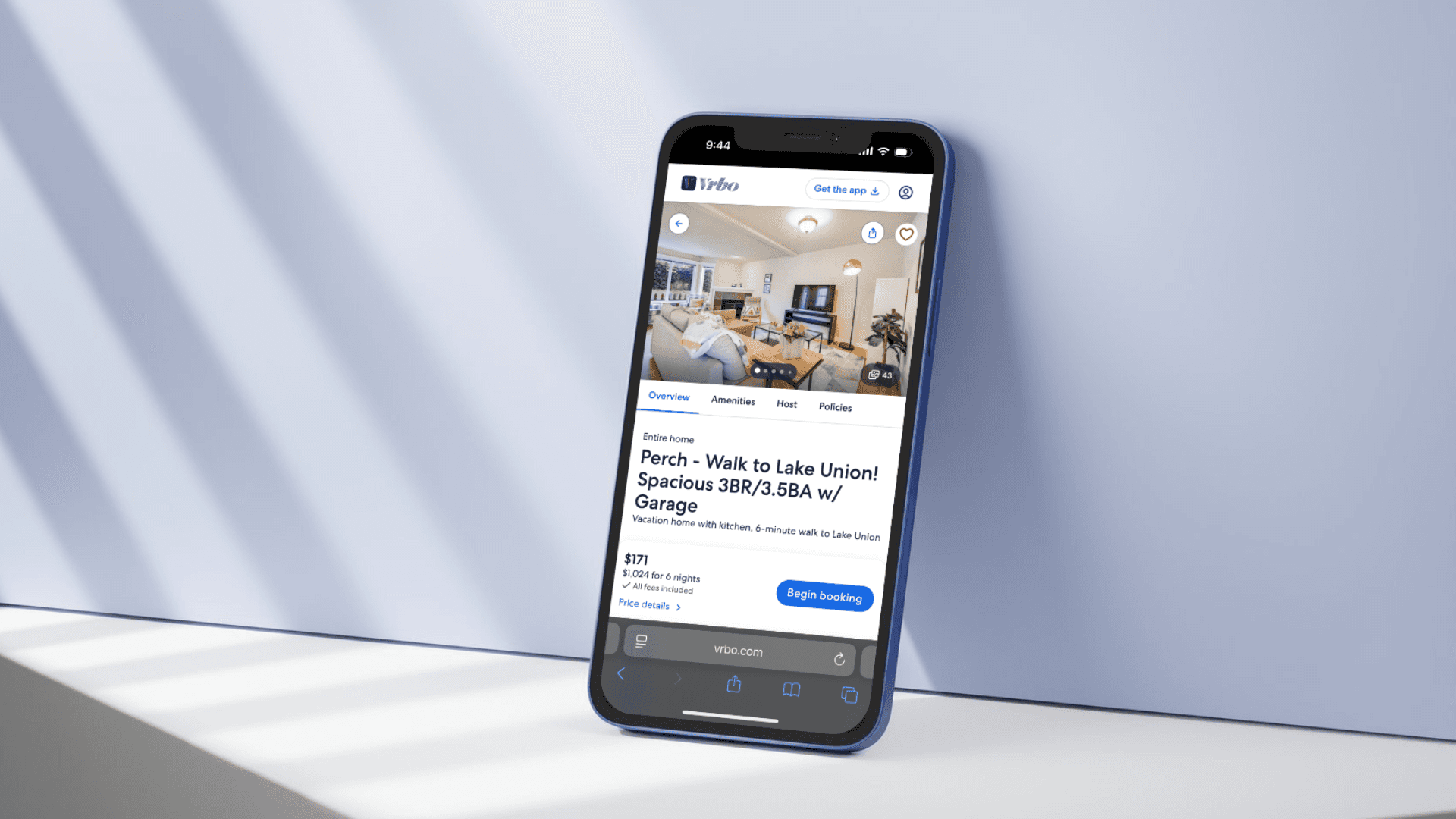
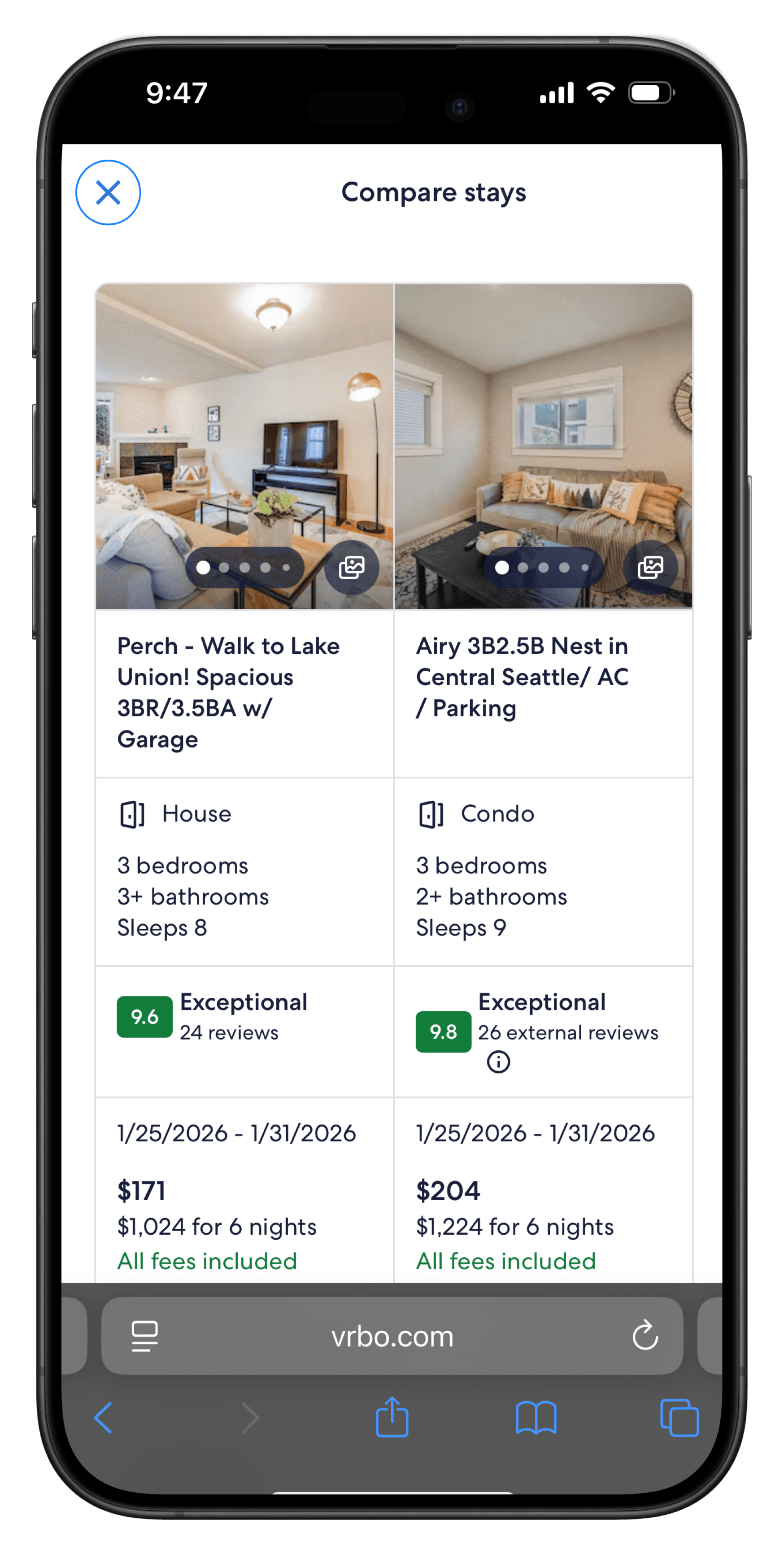
Vrbo Compare Page

Expedia Vrbo

Uncovering Friction in Traveler Booking Flows

OVERVIEW
OVERVIEW

Building a mobile app solution based on behavioral patterns observed through an autoethnography of my own lived experiences.

Usability Testing

Usability Testing

User Research

User Research

Study Design

Study Design

ROLE

UX Researcher

TIMELINE

TIMELINE

April 2026 (2 weeks)

TEAM

TEAM

3 UX Researchers
+ Expedia Research Team

See Outcomes

See Outcomes

See Outcomes

Vrbo Compare Page
Vrbo Compare Page
Vrbo Compare Page
An image of a smartphone on top of an eletronic surface

Outcomes

0

major findings with actionable recommendations for product improvement

0%

found the compare tool to be a helpful, pleasant surprise

0/7

rating for overall experience ease of use (median)

Notable Research Insights and Impact

In Implementation

In Implementation

AI Integration

Personalized shopping experience with trustworthy guidance.

50%

(3/6) users requested an AI chatbot to guide their booking experience without prompting

Smart Discovery

AI tailored property suggestions based on user preferences for easier browsing

Comparison Helper

Users expect an AI assistant within the comparison tool to help weigh their booking options

These features are currently being implemented by the Vrbo team!

Highly Recommended Feature

Highly Recommended Feature

Tool Personalization

Personalized comparisons lead to easier decisions.

Implement Algorithm System and Search History

Algorithm oriented system that remembers previous search filters and user preferences

A vibe-coded implementation example.

Context

What is Vrbo?

A vacation rental booking platform under Expedia that connects property owners with travelers looking for their next stay.

My Role

Using qualitative and quantitative research methods I designed study task flows and facilitated user interviews in collaboration with my team. I translated research findings intro recommendations presented to major product stakeholders.

The problem space.

How do traveler's decide on a property to book?

Shopping for a vacation rental involves high-stake consumer decisions.

If a data point impacted 2+ participants and/or had a severity level of 2 or lower, it was considered a finding.

Research Design

Tearing down the user journey

Identifying key questions about the experience to investigate

To make the exploratory nature of the first usability study for the mobile web experience more digestible we broke the experience into four key areas.

Search Definition

Browsing Experience (Search Results Page)

Property Detail Exploration

Comparison and Selection

3

part semi-structured interview study

to evaluate the experience with data captured across multiple UX research methods

Part 1

Part 2 - 1 hour

Part 3

Pre-test Questionnaire

Task Scenarios &
Post-Task Questionnaire

Post-test Questionnaire

  • Trip planning habits

  • Experience withVrbo

  • Their upcoming trip

  • Task observation

  • Product usability

  • Feature discovery

  • Overall product perception

  • Overall product perception

  • Additional thoughts

Attitudinal
+ Qualitative
Attitudinal + Qualitative
Attitudinal and Behavioral
+ Qualitative and Quantitative
Attitudinal
+ Qualitative and Quantitative

Unveiling user behavior through an in-lab test setting

Separate testing and observation rooms create a less intrusive atmosphere

To make the exploratory nature of the first usability study for the mobile web experience more digestible we broke the experience into four key areas.

Weighing the pros and cons

PROS

CONS

  1. Multiple Angles

  2. Screen Visibility

  3. Less Intrusive

  1. Additional Set-up

  2. Moderator Multi-Tasking

Findings

6/7

rating for overall experience ease (median)

Participants found the experience easy and familiar

Participants could fully complete tasks despite discoverability issues. The experience was familiar to the web experience (for existing users) and other booking sites (for new users).

Ease of Use Likert Scale for quantitative data measurement

What is a finding?

Analyzing data points across 2 different scales

Accounting for frequency and severity

If a data point impacted 2+ participants and/or had a severity level of 2 or lower, it was considered a finding.

Frequency

Frequency

Frequency

# of participants affected

# of participants affected

# of participants affected

Finding type

Finding type

Finding type

3+ participants

3+ participants

3+ participants

Major finding

Major finding

Major finding

2 participants

2 participants

2 participants

Minor finding

Minor finding

Minor finding

<2 participants

<2 participants

<2 participants

Not a finding (by frequency)

Not a finding (by frequency)

Not a finding (by frequency)

Severity

Severity

Severity

Rating

Rating

Rating

Title

Title

Title

1

1

1

Severe

Severe

Severe

2

2

2

Major

Major

Major

3

3

3

4

4

4

Observation

Observation

Observation

Moderate

Moderate

Moderate

Minor

Minor

Minor

N/A

N/A

N/A

Description

Description

Description

Prevents task completion

Prevents task completion

Prevents task completion

Creates significant delay/frustration

Creates significant delay/frustration

Creates significant delay/frustration

Minor effects on usability

Minor effects on usability

Minor effects on usability

Subtle enhancements desired

Subtle enhancements desired

Subtle enhancements desired

Neutral, does not impact usability

Neutral, does not impact usability

Neutral, does not impact usability

Severe

Severe

01 Visibility Issues

6/6

Participants were unaware of the compare tool

Yet the compare tool remains a helpful, pleasant surprise

Participants were unable to discover the comparison tool without moderator guidance, indicating an issue of discoverability.

Oh wow...I would definitely use this. It would help me make a decision much faster.

Participant 1

5 / 6 participants
Needed tool navigation guidance

3 / 6 participants
Looked in saved properties page

3 / 6 participants
Missed the tool entry point (button)

3 / 6 participants switched between browser tabs to compare properties

Severe

Severe

02 compare tool usability

6/6

Experienced user frustration of some kind with the compare tool

Though helpful, the compare tool isn’t perfect.

Most participant frustration stemmed from a lack of their personal prioritized information when deciding on a property.

3/6

wanted tool results tailored to their personal requirements

It would be nice if [the compare tool] would give a side by side of the things I actually filtered for earlier.

Participant 2

3/6

wanted to see review details

I don’t like that I can’t expand into the reviews to read more.

Participant 4

3/6

wanted to compare property locations

The only reason I wouldn’t use this is because I can’t compare locations.

Participant 4

Moderate

Moderate

03 Location Context

All users viewed and prioritized location

5/6

participants explicitly define

location as a critical factor

4/6

participants look at

distance from their point of interest

If I looked more carefully at this first one that I was looking at, it says it's over 3 miles from campus […] I'm ideally looking at something that's… within a two-mile radius of campus.

Participant 6

3/6

participants look for

nearby activities

When I say kid-friendly, [I mean] anything that she would like to do. So if it's by a park, by a plaza, by a playground, or…anything that I can do something with the family.

Participant 5

However

Property location context was insufficient

Users to turn to outside sources to support their decision-making process

Some users cannot easily evaluate personal preferences using just the primary tool provided, forcing them to piece together clues from photos or reviews.

Google Maps Street View

...people say [in the review about]...environments around, and that’s why I like to go into the street view... to see what it look like…I do wish that [information] was on here…

Participant 1

Reading Reviews

...people say [in the review about]...environments around, and that’s why I like to go into the street view... to see what it look like…I do wish that [information] was on here…

Participant 1

Asking ChatGPT

...here [the property location is] somewhere brand new, so...I would kind of ask ChatGPT where it would be preferable...

Participant 3

Result

Users leave the tool to validate information

Some users cannot easily evaluate personal preferences using just the primary tool provided, forcing them to piece together clues from photos or reviews.

Recommendations

Balancing Stakeholders and User Impact

Recommendations were prioritized by estimated experience impact and team resource costs.

Est. Implementation Effort

Est. Implementation Effort

Description

Description

High

High

Likely requires significant structural changes, additional research, or complex engineering work.

Likely requires significant structural changes, additional research, or complex engineering work.

May require some design changes and moderate development effort.

May require some design changes and moderate development effort.

Moderate

Moderate

Low

Low

Likely involves minor design or content changes and relatively quick implementation.

Likely involves minor design or content changes and relatively quick implementation.

High

High

Tool Personalization

Personalized comparisons lead to easier decisions.


A compare tool more responsive to user's specific needs supports them to confidently select their ideal property.

Algorithm System and Search History

Algorithm oriented system that remembers previous search filters and user preferences

A vibe-coded implementation example.

High

High

In Implementation

In Implementation

AI Integration

Personalized shopping experience with trustworthy guidance.

50%

(3/6) users requested an AI chatbot to guide their booking experience without prompting

Smart Discovery

AI tailored property suggestions based on user preferences for easier browsing

like…I want to go to China for two weeks. I prioritize price and I want this location. I want it to be cleaned. Give me some recommendations… And then I’ll expect it to just give me… ...if the accuracy get to a point where it’s very good, then I’ll be open to that

Participant 4

Comparison Helper

Expected an AI assistant within the comparison tool to help weigh their booking options

These features are currently being implemented by the Vrbo team!

Low

Low

Enhanced Visibililty

Ease of access leads to discoverability.

Navigating to saved properties was difficult, due to its hidden location and misaligned identifiers. The "compare stays" entry point lacked visual weight and users frequently scrolled past.

Improved Visual Weight

Before

Before

After

After

The text of the button could also be an alternative color, or increased in size. to increase visual weight

Easier Tool Access

Before

Before

After

After

Many participants struggled with finding the trips page and associated the "heart" icon with favorites.

Next Steps

Future Research Directions

Our study was largely explorative. In order to further develop the product based on the research insights further research in user trust and discovery is recommended.

Study Limitations

  • Lack of quantitative data due to open-ended nature of study

  • Small number, and unrepresentative set of participants due to time constraints

  • Test phone usage limited data to IOS user flows only

Next Steps

  • A/B testing of the compare tool discoverability and graphical changes

  • User research on expectations of AI integration

Some of these steps are already being taken!

What I Learned

An exploratory study lets participants guide the session

  • Open-ended nature makes it difficulty to interject with further questions

  • A large scope makes it easier to miss important quantitative data collection

  • Ran into time crunches at the end of sessions, forcing us to guide participants to decide on properties sooner

My wonderful team!

Available for Fulltime Work

Keep Exploring ᯓ★

10:56:56 PM

Seattle, WA

© 2026 Janny Gao, Made with coffee, dry eyes, and neck cramps.

Available for Fulltime Work

Keep Exploring ᯓ★

10:56:56 PM

Seattle, WA

© 2026 Janny Gao, Made with coffee, dry eyes, and neck cramps.

Available for Fulltime Work

Keep Exploring ᯓ★

10:56:56 PM

Seattle, WA

© 2026 Janny Gao, Made with coffee, dry eyes, and neck cramps.